Colmar: immensely beautiful

Colmar is indeed a beautiful place. I had the pleasure of visiting Colmar in August 2013 – In addition to the Pinot Gris and Muscat, Alsace is famous for the Gewurztraminer wines which are a must try wines.

livetomoveit's avatarlive to move it - became globevisuals.com - visit me there!

Very often, when you are looking through the photos of a place you want to visit, they appear a bit brighter than the place itself when you finally there. Photographers use filters and sophisticated means to make their works if not a piece of art but at least simply look better. I cannot argue, their works are catchy, but sometimes too far away from reality. In that sense, Colmar is exactly the same as when you see it on all the artistic pictures. It is bright and beautiful without any filters and colors’ amplification. Blossoming flowers, sweet gingerbread houses and lively channels… Total awesomeness!

IMG_2883

View original post 997 more words

Rim-lit Bottle and Glass.

There are many subjects that I want to tackle at some point and this is one of them:-

A rim-lit bottle and glass – but I wasn’t sure of the best way of achieving it. I was flicking through this book looking for inspiration (not necessarily looking to fulfil this ambition):-

Photos that sell Lee frost.

when I came across the answer, or at least one answer (page 176), I decided to get to work. Lee Frost recommends a large backlight with a strip of black material covering the middle; I used a bit of black card instead as my black material was too heavy but I think that I achieved a pleasing result – here is my set up:-

_DSC3416 small

I have blinds in my studio and so I pulled them all down. Lee describes using “a couple of bottles of decent full-bodied plonk (knowing the contents would have to be consumed afterwards)”, I cheated; I used blackcurrant squash, and a cheap one at that! I didn’t drink the squash afterwards – it only has to look the part right?

I did take a light reading but this was only a ball-park figure as the light meter will give me a mid-tone (18% grey for those who need more detail) but I knew that I was dealing with extremes of the spectrum and not mid ranges – I tried various exposures around me metered reading until I was happy. Aperture was set at f16 so that I had sufficient depth of field and adjusted the strength of the octibox and flash head to get my exposure. I then tried a selection of compositions – the ones that I have shown are the ones that I was happiest with.

Post processing consisted of fiddling with contrast, saturation and exposure in Lightroom – I like to selectively sharpen my images so that large swathes of one colour, in this case black, don’t end up generating digital noise. I also made sure that I had absolute black when appropriate, for the same reason. I output my files from Lightroom as TIFFS in case I want to edit further in Photoshop.

I decided to try then as monochome images too; again I was pleased with the results:-

I created monochrome images in Nik Silver Efex pro. I gave each a different treatment; one has a sepia effect, anther a cool blue tone whilst the other two are black and white.

It is not that easy to see the subtle changes in treatment here but they can be seen in greater detail in my My 500px Fine Art Gallery here (the colour versions are there too).

Mobile Phone Photographs.

Have you got a smart mobile phone with a camera? Good. Do you take photographs with it? Do you try to take artistic photographs with it as opposed to “record shots” (not that there is anything wrong with doing that – millions of us do it)? So do I and I have recently been playing with some of the free and paid photo apps that are available for Android phones on Google Play. (Many of the apps are available for iPhones through the usual channels for iPhone apps) I am having a wonderful time and the experience has increased my creativity – whether my efforts are any good or not remains to be seen but I am feeling more creative.

If you are trying to create something from your phone pictures you need to use some apps because with the best will in the world 5,10 or even 13 Megapixels from the tiny sized sensor on your phone is not going to give the same quality as the equivalent Pixel count on a Digital Slr or bridge camera due to technical limitations of physically small sensors – the apps help you to overcome those limitations by “covering up” digital noise and other aberrations 😉

I have tried several apps, some I have kept and some I wasn’t so keen on so deleted them. The ones that I use most often are Snap Seed – great for general editing and it has several creative effects, Super Photo – I started off with the free version but there are quite a few adverts and some of the best effects are unavailable unless you upgrade to the paid version (the paid version is about £2.50) which I did – the effects are much more pronounced and I will go to SuperPhoto when I want something arty – you cannot really make adjustments like cropping, brightness or saturation but it is good for effects, PicsArt which is good for making adjustments and it has some great effects – the thing that makes me use this one mostly is its ability to make your picture format square (for Instagram) without losing a bit of your picture, it does it by expanding your rectangular photo into a square and filling the extra bits with blur or colours – your choice. The first app that I downloaded was Photoshop express; I think that they call it something else now but it is free and useful. It has some good effects and you can edit cropping, brightness, saturation and a whole load of other things, and it is from Adobe. I have also downloaded Photo Lab (free), Photo Editor (free) and PicShop lite (free). There were others that I tried and deleted because they were too much like apps that I already had or they were very clunky and kept crashing. You just have to try a few and see how you get on with them and then if you like them, consider investing in the paid version if it is worth you while.

Here are a few of the photographs that I have taken On my phone and then processed with one or more of the apps:-

The majority of these have been through Snapseed, SuperPhoto or both –  the great thing is you can then send them directly to Instagram (which also has some good tools build in) , Facebook, Pinterest or to more or less any place that you have an account that you might want to share your photos to without having to bother with your computer.

Next I thought it would be a jolly wheeze to download photos from other cameras onto my phone with a view to using the same effects on them. Here are some of my efforts:-

As you can see I have managed to utilise many different effect onto what were “straight” photographs – effects such as “Banksy” (SuperPhoto), Photo in an old book and face in coffee cup (PhotoLab), Conte camera girl (superPhoto), And a couple of “Pop art” inspired shots (again SuperPhoto).

A word of caution though, often these apps will reduce the resolution of your full resolution photographs – even ones that say that they don’t – I had this problem with SuperPhoto, I wanted to use some of the new creations for printing and found that they were too small – I subsequently found that SuperPhoto do an App (paid – about £3.50) for Windows, so I bought that and I am a happy camper again. Another solution is to use a resizing Program on your computer, I use the one that comes with OnOne Phot0 10.

I had been curious about photography using my phone for some time but I was particularly inspired to indulge in after seeing a presentation at my local camera club by Gerry Coe. He is a Northern Irish photography expert who not content with Becoming a Fellow of the British Institute of Professional Photographers (FBIPP), a Fellow of the Royal Photographic Society, a Fellow of the Master Photographers Association and a Fellow of the Society of Wedding and Portrait Photographers, went on to gain a second FBIPP for his iPhone photography. His iPhone photography site is:-

Gerry Coe iPhone Photos

If you want to have a look at my Instagram stuff – search for paulcullenphoto

Gerrys instagram account is coeiphoneart

Why don’t you give it a try?
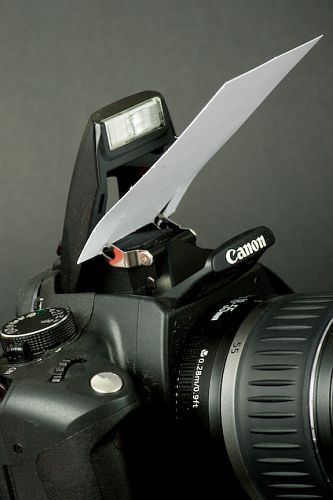
One way to avoid harsh contrast and red eye with on camera flash.

If you are anything like me you will dislike the harsh contrast, red-eye and blown out effect of on camera flash – it is never a good effect. In the absence of sufficient daylight it is often necessary to use artificial light and off-camera illumination is best. It is not always practical to carry the required kit but there is an inexpensive (and easy to carry) way to make the best of what you have got.

This is a technique that I have often used when photographing things for ebay but it can be used in many situations. It does depend on having a white ceiling above* you (other colours will create a colour cast of that colour) but it enables you to use that ceiling to create a softer and more pleasing light for your subject; the solution is portable and won’t break the bank. Personally, I use an C5 white envelope which gives even more diffusion but this solution is even more portable:-

601d62b9939b840d384c0050a7bdca60

It works by deflecting and slightly diffusing the light instead of it going directly ahead. The light is then reflected and further diffused by the ceiling. The diffusion and the fact that the light follows the same path (downwards) that we are used to from sunlight, makes the lighting more pleasing to the eye. You also avoid lots of light hitting the back of your portrait subjects eyes (red-eye).

*If you were to turn the camera through 90 degrees (portrait format) you would require a white wall (or other white reflector) to the side of the camera that the on-camera flash sits, in order to “bounce” the light back onto your subject in the same way that you used the ceiling.

This technique is a compromise but will vastly improve your results over direct on-camera flash. Happy snapping!

(Photo source – Pinterest, Photographer unknown)

A few of the things to remember before releasing the shutter.

Always check for distracting details.168b5a4b2e23162a6bdb26f2b39a5e05

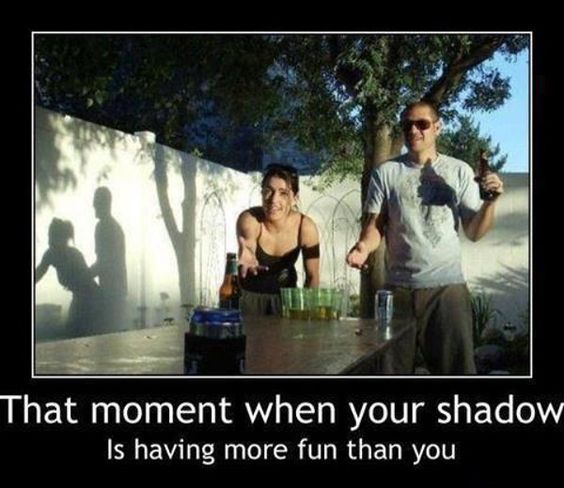
Watch for where shadows fall.

410be71790774264d0ae36dc72c3c027

We might all take photographs but not everyone is a photographer.

26528cd977c03a167a6403f89d773be6

It is important to capture people at their best.

d25c40544935d359dc3482230900f7b0

Have a good day.